


When building modern applications, dealing with failures in external dependencies is inevitable. Network issues, service outages, temporary overloads—these problems are part of the distributed systems landscape. The key isn’t preventing these failures (you can’t), but rather handling them gracefully. Polly provides several reactive resilience strategies that respond to failures as they occur. In this post, we’ll explore four essential reactive strategies: Retry, Circuit Breaker, Fallback, and Hedging. Each addresses different failure scenarios and can be combined to create robust resilience pipelines.
Understanding Reactive vs Proactive Strategies
Before diving in, it’s important to understand what makes a strategy “reactive.” Reactive strategies respond to failures after they occur. They detect problems and take corrective action. This contrasts with proactive strategies like Rate Limiting and Timeout, which prevent problems before they happen by constraining resource usage or limiting execution time.
The Retry Strategy
The Retry strategy is the most straightforward resilience pattern: if something fails, try it again. This works well for transient failures—temporary problems that resolve themselves quickly, like brief network hiccups or momentary service unavailability. When to Use Retry
Retry is ideal for:
- Transient network failures
- Temporary service unavailability (503 Service Unavailable)
- Database deadlocks or connection timeouts
- Any failure that’s likely to succeed if you just try again
Basic Retry Configuration
builder.Services.AddResiliencePipeline("retry-pipeline", pipelineBuilder =>
{
    pipelineBuilder.AddRetry(new RetryStrategyOptions
    {
        MaxRetryAttempts = 3,
        Delay = TimeSpan.FromSeconds(2),
        BackoffType = DelayBackoffType.Exponential,
        UseJitter = true
    });
});
This configuration will retry up to 3 times. The backoff type setting causes the delay between requests to increase exponentaily. Intially there will be a delay of 2 seconds before the first retry, 4 seconds before the second, and 8 seconds before the third. A random jitter to prevent thundering herd problems
Handling Specific Exceptions
Not all failures are worth retrying. Some errors, like authentication failures or bad requests, won’t be resolved by simply trying again. That’s why Polly allows you to configure exactly which failures should trigger a retry through the ShouldHandle predicate.
The PredicateBuilder provides a fluent API for defining retry conditions. You can chain multiple exception types together, or even combine exception handling with result inspection. This gives you fine-grained control over your retry logic.
For example, you might want to retry on transient network errors HttpRequestException or timeouts TimeoutException, but you’d also want to retry when a service returns a 503 Service Unavailable status—indicating temporary overload. Here’s how you configure that:
pipelineBuilder.AddRetry(new RetryStrategyOptions
{
    MaxRetryAttempts = 3,
    ShouldHandle = new PredicateBuilder()
        .Handle<HttpRequestException>()
        .Handle<TimeoutException>()
        .HandleResult<HttpResponseMessage>(response =>
            response.StatusCode == HttpStatusCode.ServiceUnavailable)
});
The Danger of Naive Retries
While retries are powerful, they must be implemented carefully. Retrying too aggressively can actually make problems worse. When a service is already struggling under heavy load, a flood of retry attempts can overwhelm it further, preventing it from recovering. This can trigger cascading failures that ripple through your entire system.
One particularly problematic scenario is the “thundering herd” problem. Imagine hundreds or thousands of clients all experiencing the same failure at the same moment. If they all immediately retry, and then retry again at the same intervals, you’ve effectively amplified the load on the struggling service rather than giving it room to recover.
This is why exponential backoff and jitter are critical components of a well-designed retry strategy. Exponential backoff increases the delay between successive retry attempts, while jitter adds randomness to those delays, spreading out retry attempts across time. These techniques prevent clients from synchronizing their retries and give downstream services breathing room to stabilize.
For even better protection, combining a Retry strategy with a Circuit Breaker creates a robust defense mechanism. The circuit breaker can detect when a service is persistently failing and stop sending requests altogether, preventing your retry logic from contributing to the problem.
The Circuit Breaker Strategy
The Circuit Breaker pattern prevents your application from repeatedly trying operations that are likely to fail. It “opens” (stops executing requests) when failure rates exceed a threshold, giving the failing service time to recover.
When to Use Circuit Breaker:
- Calling external services that might be down
- You want to fail fast instead of waiting for timeouts
- Protecting downstream services from overload
- Preventing cascading failures in microservices
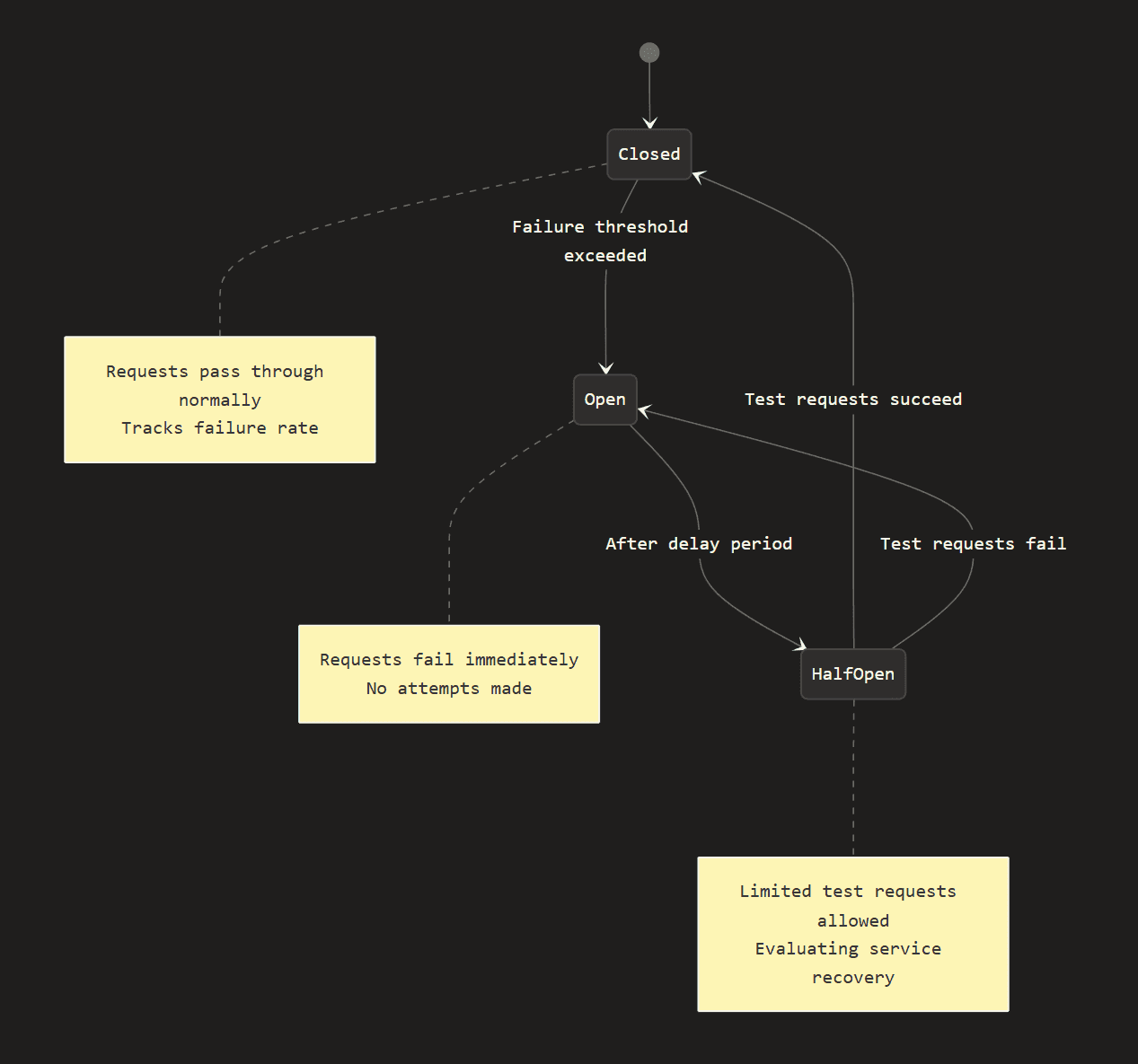
A circuit breaker operates through three distinct states. In the Closed state, the circuit breaker allows requests to pass through normally while monitoring for failures. When the failure threshold is exceeded, it transitions to the Open state, where all requests fail immediately without even attempting to call the downstream service. This prevents additional load on an already struggling service and gives it time to recover. After a configured delay period, the circuit breaker moves to the Half-Open state, where it allows a limited number of test requests through to determine if the service has recovered. If these test requests succeed, the circuit breaker returns to the Closed state and resumes normal operation. However, if the test requests fail, it immediately returns to the Open state to continue protecting the system.
| State | Behavior | Transition |
|---|---|---|
| Closed | Requests pass through normally | Opens when failure threshold is exceeded |
| Open | Requests fail immediately without attempting | Transitions to Half-Open after a delay |
| Half-Open | Allows a limited number of test requests | Closes if tests succeed, reopens if they fail |
Basic Circuit Breaker Configuration
pipelineBuilder.AddCircuitBreaker(new CircuitBreakerStrategyOptions
{
    FailureRatio = 0.5,
    SamplingDuration = TimeSpan.FromSeconds(30),
    MinimumThroughput = 10,
    BreakDuration = TimeSpan.FromSeconds(30),
    ShouldHandle = new PredicateBuilder()
        .Handle<HttpRequestException>()
        .HandleResult<HttpResponseMessage>(r => !r.IsSuccessStatusCode)
});
This circuit breaker monitors incoming requests and opens when 50% of them fail within a 30-second sampling window. To avoid premature triggering on low traffic, it requires at least 10 requests before evaluating the failure ratio. Once opened, the circuit breaker remains in that state for 30 seconds, blocking all requests to give the downstream service time to recover. After this break duration expires, it transitions to a half-open state to test if the service has stabilized. The circuit breaker is configured to handle both HTTP request exceptions and responses with non-success status codes, treating either condition as a failure that counts toward the threshold.
Monitoring Circuit Breaker State You can also monitor changes in the circuit’s state.
pipelineBuilder.AddCircuitBreaker(new CircuitBreakerStrategyOptions
{
    // ... configuration ...
    OnOpened = args =>
    {
        logger.LogWarning("Circuit breaker opened for {BreakDuration}",
            args.BreakDuration);
        return ValueTask.CompletedTask;
    },
    OnClosed = args =>
    {
        logger.LogInformation("Circuit breaker closed");
        return ValueTask.CompletedTask;
    },
    OnHalfOpened = args =>
    {
        logger.LogInformation("Circuit breaker testing recovery");
        return ValueTask.CompletedTask;
    }
});
The Fallback Strategy
Imagine your e-commerce site relies on a product recommendation service to show personalized suggestions to customers. When that service goes down, you have a choice: display an error message and lose potential sales, or gracefully fall back to showing your bestselling products instead. The Fallback strategy enables the second option, allowing your application to provide degraded but functional service rather than complete failure.
The Fallback strategy provides an alternative when the primary operation fails. Instead of propagating errors to the caller, you return a default value, call a backup service, or return cached data. This keeps your application running and maintains a positive user experience even when dependencies fail.
When to Use Fallback
Fallback is perfect for:
- Providing degraded functionality when services are unavailable
- Returning cached or stale data
- Using default values for non-critical operations
- Switching to a backup service
Fallback shines in scenarios where some data is better than no data, or where alternative sources can temporarily substitute for your primary service. Consider using fallback when you need to provide degraded functionality during service outages—for example, showing static content when your content management system is down, or displaying last week’s product catalog when your inventory service is unavailable.
Returning cached or stale data is one of the most common fallback patterns. A news site might show articles from its cache when the database is unreachable, or a weather app might display the last successful forecast when the weather API fails. While this data isn’t current, it’s often better than showing nothing at all.
For non-critical operations, using default values can maintain functionality without disrupting the user experience. If a personalization service fails, falling back to a generic homepage keeps users engaged rather than blocking them with an error. Similarly, when you have redundancy built into your architecture, fallback enables automatic switching to backup services—like routing to a secondary data center when the primary one becomes unavailable.
Basic Fallback Configuration
pipelineBuilder.AddFallback(new FallbackStrategyOptions<WeatherForecast>
{
    ShouldHandle = new PredicateBuilder<WeatherForecast>()
        .Handle<HttpRequestException>()
        .Handle<BrokenCircuitException>(),
    FallbackAction = args =>
    {
        // Return cached or default data
        var cachedForecast = cache.Get<WeatherForecast>("weather");
        return Outcome.FromResult(cachedForecast ?? GetDefaultForecast());
    }
});
Fallback to Alternative Service
pipelineBuilder.AddFallback(new FallbackStrategyOptions<ProductData>
{
    ShouldHandle = new PredicateBuilder<ProductData>()
        .Handle<HttpRequestException>(),
    FallbackAction = async args =>
    {
        // Try backup service
        var backupClient = args.Context.ServiceProvider
            .GetRequiredService<IBackupProductService>();
        var result = await backupClient.GetProductAsync(args.Context);
        return Outcome.FromResult(result);
    }
});
Informing Users of Degraded Service
FallbackAction = args =>
{
    var response = GetCachedData();
    response.IsCached = true;
    response.CacheAge = DateTime.UtcNow - response.CachedAt;
    return Outcome.FromResult(response);
}
The Hedging Strategy
Hedging (also called “parallel requests” or “backup requests”) executes multiple requests in parallel and uses the first successful response. This strategy addresses a common challenge in distributed systems: unpredictable latency. Even when services are healthy, individual requests can experience unexpected delays due to factors like garbage collection pauses, network congestion, or thread pool exhaustion on the server.
The hedging strategy works by sending an initial request and, if it doesn’t complete within a specified time window, launches additional parallel requests to the same endpoint (or alternative endpoints). Whichever request completes first wins, and the others are canceled. This approach dramatically reduces tail latency. Those frustratingly slow requests that fall in the 95th or 99th percentile of response times.
Consider a search service where most queries return in 100ms, but 5% take over 2 seconds due to cache misses or complex queries. Without hedging, users occasionally experience those painful 2-second delays. With hedging configured to send a second request after 200ms, you can cut those worst-case scenarios significantly. If the first request is slow, the second one likely won’t encounter the same bottleneck and will return quickly.
This strategy is particularly valuable for read operations against replicated data stores, time-sensitive APIs where user experience depends on fast responses, and systems where predictable performance is more important than minimizing resource usage. However, hedging does come with a trade-off: you’re increasing load on downstream services by making redundant requests, so it should be used thoughtfully and typically only for the slowest percentile of requests.
When to Use Hedging
Hedging is valuable when:
- Tail latencies are a problem (some requests are much slower than others)
- You have multiple equivalent service endpoints
- Latency is more important than resource consumption
- Idempotent operations where duplicate requests are safe
Basic Hedging Configuration
pipelineBuilder.AddHedging(new HedgingStrategyOptions<HttpResponseMessage>
{
    MaxHedgedAttempts = 2,
    Delay = TimeSpan.FromSeconds(1),
    ShouldHandle = new PredicateBuilder<HttpResponseMessage>()
        .HandleResult(r => !r.IsSuccessStatusCode)
});
Combining Strategies
The real power of Polly comes from combining strategies. Here’s a complete resilience pipeline using all four reactive strategies:
builder.Services.AddResiliencePipeline("comprehensive-pipeline", pipelineBuilder =>
{
    pipelineBuilder
        // Fallback provides the outer safety net
        .AddFallback(new FallbackStrategyOptions<WeatherForecast>
        {
            ShouldHandle = new PredicateBuilder<WeatherForecast>()
                .Handle<BrokenCircuitException>()
                .Handle<HttpRequestException>(),
            FallbackAction = args => Outcome.FromResult(GetCachedWeather())
        })
        // Circuit breaker prevents overwhelming failing services
        .AddCircuitBreaker(new CircuitBreakerStrategyOptions
        {
            FailureRatio = 0.5,
            SamplingDuration = TimeSpan.FromSeconds(30),
            MinimumThroughput = 10,
            BreakDuration = TimeSpan.FromSeconds(30)
        })
        // Retry handles transient failures
        .AddRetry(new RetryStrategyOptions
        {
            MaxRetryAttempts = 3,
            Delay = TimeSpan.FromSeconds(1),
            BackoffType = DelayBackoffType.Exponential,
            UseJitter = true
        })
        // Hedging reduces tail latency
        .AddHedging(new HedgingStrategyOptions<WeatherForecast>
        {
            MaxHedgedAttempts = 1,
            Delay = TimeSpan.FromMilliseconds(500)
        });
});
Strategy Order Matters
The order you add strategies determines how they interact:
- Outer strategies wrap inner strategies: Fallback (outer) catches exceptions from Circuit Breaker (inner)
- Circuit Breaker should wrap Retry: This prevents retries from overwhelming an already-failing service
- Hedging is typically innermost: Individual hedged attempts should go through retry/circuit breaker logic
Best Practices
- Start simple: Begin with just Retry or Circuit Breaker, then add complexity as needed
- Monitor everything: Use telemetry to understand when and why strategies activate
- Test your resilience: Simulate failures to verify your strategies work as expected
- Consider the user experience: Fast failures (Circuit Breaker) are often better than slow retries
- Be mindful of downstream services: Aggressive retries can make problems worse
- Use exponential backoff and jitter: Prevent thundering herd problems
- Make fallbacks meaningful: Don’t just return null—provide useful degraded functionality
Conclusion
Reactive resilience strategies are essential tools for building reliable distributed systems. Each strategy addresses different failure scenarios:
- Retry handles transient failures
- Circuit Breaker prevents cascading failures and allows recovery
- Fallback provides graceful degradation
- Hedging reduces tail latency
By understanding when and how to use each strategy, and how to combine them effectively, you can build applications that gracefully handle the inevitable failures in distributed systems. The key is finding the right balance between resilience, performance, and resource consumption for your specific use case.